


Bevy 0.19
Posted on June 19, 2026 by Bevy Contributors

Thanks to 261 contributors, 1185 pull requests, community reviewers, and our generous donors, we're happy to announce the Bevy 0.19 release on crates.io!
For those who don't know, Bevy is a refreshingly simple data-driven game engine built in Rust. You can check out our Quick Start Guide to try it today. It's free and open source forever! You can grab the full source code on GitHub. Check out Bevy Assets for a collection of community-developed plugins, games, and learning resources.
To update an existing Bevy App or Plugin to Bevy 0.19, check out our 0.18 to 0.19 Migration Guide.
Since our last release a few months ago we've added a ton of new features, bug fixes, and quality of life tweaks, but here are some of the highlights:
- Next Generation Scenes: Our brand new, massively improved scene system for Bevy has finally landed! Ergonomically define scenes in our new BSN (Bevy Scene Notation) format in code via the
bsn!macro or (in a future release) in assets. Scenes are composable, patchable, and dependency aware. No more manually pulling in all of the ECS and asset dependencies required to spawn something! - Render Bigger Scenes Faster: We've moved even more work to the GPU and optimized the renderer in a number of areas. Bevy can draw even more things even faster!
- Contact Shadows: Shadow quality makes a huge difference to how "polished" your game looks. Bevy 0.19 adds contact shadows to the mix, dramatically improving shadow detail without the cost of full raytracing.
- More Feathers Widgets: Bevy's opinionated "editor tooling" widget collection got a ton of new widgets. It was also ported to BSN, making it much more pleasant to use!
- Text Input: Bevy UI finally has upstream support for text entry via the new
EditableTextcomponent. - Richer Text: Bevy now has more flexible font selection, with support for higher level features like "font families" and variable font properties.
- App Settings: We've added an official "app settings" framework, which can load and save settings from files and expose them as ECS resources.
- Post Processing Effects: We've added built in "vignette" and "lens distortion" post processing effects.
- Improved Skinned Mesh Culling: Skinned meshes can now take their animations into account when they are being culled.
Next Generation Scenes #
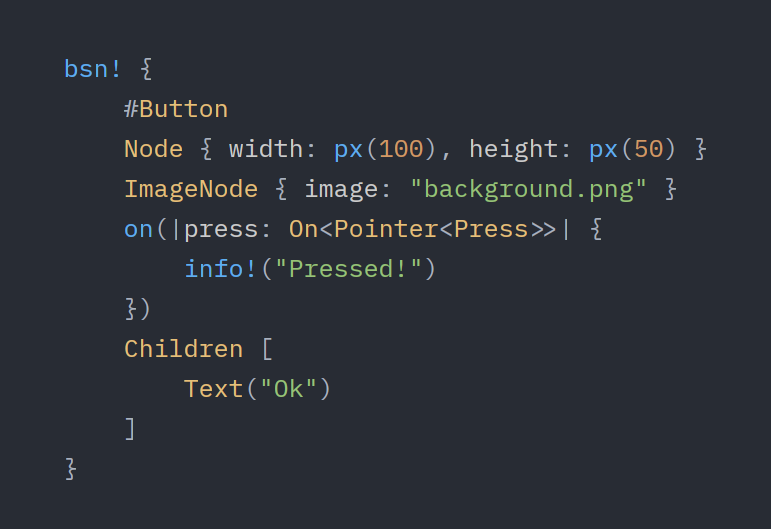
Bevy 0.19 introduces our brand new, massively improved scene system for Bevy. We've been working on this for a long time (years now!), and we are excited to finally get it in the hands of Bevy developers. It makes defining scenes in code (and ultimately in assets produced by the upcoming Bevy Editor) much nicer. It will also be used to build the upcoming Bevy Editor!
BSN (Bevy Scene Notation) #
BSN is an ergonomic Rust-like scene syntax which can be defined in Rust code via the bsn! macro and in .bsn asset files. If you were ever bothered by the verbosity and complexity of spawning complex collections of entities in Bevy, you will probably enjoy what BSN has to offer. BSN can be used to spawn anything in the ECS. This benefits all scenarios, but it is worth calling out explicitly that this makes Bevy UI code significantly easier to read and write.
Some quick caveats: while Bevy 0.19 technically supports scene assets, we aren't yet shipping a first-party .bsn asset loader. This release focuses on the code-driven workflow, and we plan to roll out the asset driven workflow in a future release. Additionally, BSN is still hot off the presses and it will likely take a few releases for us to iron out the experience. It is plenty useful now, but expect some rough edges and missing features.
In Rust, a bsn! expression is essentially a list of components to add to an entity:
bsn! {
    Player {
        score: 0
    }
    Team::Blue
}
So far this looks and behaves much like Bevy's existing In BSN, you don't need to specify every field, or use You can also just specify the type name if you want all the fields to take on their default values: Field values can be arbitrary Rust expressions via BSN has first-class support for ECS Relationships. You can spawn related entities (such as children) inline: This also works for custom relationships: These can accept and use parameters: A BSN expression is a "patch"; it does not write a "full" instance of every type it defines. This means you can layer scenes on top of each other: While Bevy 0.19 doesn't ship with an official This (if there was a Also note the We're working on an official Entities in a The "BSN relationship syntax" seen above (ex: A BSN expression actually defines "templates" for components rather than the actual components themselves. A The "old" approach to spawning via bundles required passing in every ECS dependency into a bundle function and manually using that dependency to produce the final value: This gets quite nasty when spawning complex deeply nested scenes with many dependencies. BSN makes this all much easier: Spawning a scene no longer requires knowing every little dependency it requires internally, and common actions like loading and assigning assets via their paths is simple! This does mean that BSN requires types to have a BSN ships with support for "inline assets" via the Compare that to what was necessary before! BSN has special "entity reference syntax" to define an Entity's This is essentially the same as: However "entity reference syntax" also enables referencing that entity elsewhere in the scene: You can access any entity reference defined in a given In the context of Most values in "field position" support "implicit This works because It has almost been a Bevy developer rite of passage to define something like a BSN solves this problem by making it possible to associate a Scene components can then be spawned like this: Scene Components must be spawned this way (as a "scene component"), and will log errors if they are spawned directly (ex: via Scene Components can also define "props" which are passed into the scene function and can inform BSN outputs: "Props" are evaluated first (before component field patches). Logically, they are evaluated immediately / in-place and the SceneComponent's scene is immediately applied to the current scene. This means the scene they produce can be patched. This also means that you cannot patch "props", as they do not exist later in the scene. The Again, note that Bevy 0.19 does not ship with a The Bevy 0.19 ships with a helper to easily spawn scene functions. This is a fully self-contained Bevy app that spawns a 2D scene:Bundle (which is just a collection of components). But BSN has a ton of additional superpowers!Click here to see everything BSN has to offer!
Optional Fields #
..Default::default(). You only need to set the fields you care about, and the rest will have their default values:#[derive(Component, Default, Clone)]
struct Player {
score: usize,
coins: usize,
}
bsn! {
Player {
score: 0
}
}bsn! {
Player
}{} syntax:bsn! {
Player { score: {current_points + 10} }
}BSN Relationships #
bsn! {
Player
Children [
Sword,
Shield,
]
}bsn! {
Player
Inventory [
Apple,
Potion,
]
}Scene Functions #
bsn! returns a type that implements the Scene trait, meaning you can define reusable BSN functions like this:fn player() -> impl Scene {
bsn! {
Player
Children [ Sword, Shield ]
}
}fn player(name: &str) -> impl Scene {
bsn! {
Name(name)
Player
}
}Scenes are Composable Patches #
fn button() -> impl Scene {
bsn! {
Button
Node { width: px(100) }
}
}
fn my_button() -> impl Scene {
bsn! {
button()
Node { height: px(100) }
}
}my_button will spawn with a Node { width: px(100), height: px(100) } component. Components in scenes are initialized to their defaults, and each additional scene layer writes its fields on top of those defaults.Scene Assets and Caching #
.bsn asset loader, it does already functionally support scene asset dependencies. We just don't yet include any built-in loaders for them:commands.queue_spawn_scene(bsn! {
:"player.bsn"
Transform {
translation: Vec3 { x: 10. }
}
}).bsn asset loader) would spawn a scene that includes the "player.bsn" scene asset and patches the "x position" to be 10. BSN is dependency-aware: if you use queue_spawn_scene instead of spawn_scene, it will wait to spawn the scene until all dependencies have loaded. spawn_scene will always try to spawn the scene immediately ... if it has scene dependencies that aren't loaded yet it will fail.:, which is "caching" syntax. When first loaded, this will resolve the "player.bsn" scene and cache the results for reuse. This makes spawning multiple instances of the scene much cheaper, as it only needs to resolve whatever is layered "on top" of the cached scene..bsn asset loader, and we also plan on porting Bevy's glTF loader to the new scene system (so you can depend on "my_scene.gltf" just like you would a my_scene.bsn file). The bsn! macro and spawning system already supports scene assets, so if you're feeling adventurous you can try implementing your own Bevy scene asset format while you wait for ours!Scene Lists #
bsn! / Scene corresponds to a single entity. bsn_list! / SceneList is the same idea, but applied to lists of entities:fn players() -> impl SceneList {
bsn_list! [
(#Player1 Team::Blue),
(#Player2 Team::Red),
]
}bsn_list! are comma separated, and the parentheses to visually indicate entity boundaries are optional:fn players() -> impl SceneList {
bsn_list! [
#Player1 Team::Blue,
#Player2 Team::Red,
]
}Children []) uses SceneList. This means you can pass scene lists as arguments to your scenes:fn widget(children: impl SceneList) -> impl Scene {
bsn! {
Widget
Children [ {children} ]
}
}Observing Events #
bsn! entities can easily observe events, making it easy to embed "callback-style" behaviors in your scenes:fn button() -> impl Scene {
bsn! {
Node { width: px(100), height: px(50) }
on(|press: On<Pointer<Press>>| {
info!("button pressed!")
})
}
}Templates #
Template is essentially a fancy constructor for a type, which produces an output type (such as a Component). Critically, Template has access to the World, the current entity, and the "scene spawn context". This enables powerful behaviors, such as loading assets from a given asset path and producing asset handles (ex: Handle<Image>).fn player(asset_server: &AssetServer) -> impl Bundle {
(
Player {
score: 10,
..Default::default()
},
children! [
Sprite {
image: asset_server.load("player.png"),
..Default::default()
}
]
)
}
fn setup(mut commands: Commands, asset_server: Res<AssetServer>) {
commands.spawn(player(&asset_server))
}fn player() -> impl Scene {
bsn! {
Player { score: 10 }
Children [
Sprite { image: "player.png" }
]
}
}
fn setup(mut commands: Commands) {
commands.spawn_scene(player());
}Template. This is accomplished via the FromTemplate trait, which tells BSN what Template type it should use for a given Component. FromTemplate can be derived, which will also generate a Template type for your type. Fortunately, most types do not need to derive or implement FromTemplate manually. This is because FromTemplate and Template is automatically implemented for every type that implements Default and Clone. These types are "templates of themselves" and are just "passed through". You only need to derive FromTemplate if you need template features (such as the Sprite use case above, which uses a Handle<Image> template to accept "player.png").Inline Asset Templates #
asset_value template:fn cube() -> impl Scene {
bsn! {
Mesh3d(asset_value(Cuboid::new(1., 1., 1.)))
}
}fn setup(meshes: Res<Assets<Mesh>>) -> impl Bundle {
let handle = meshes.add(Cuboid::new(1., 1., 1.));
Mesh3d(handle)
}Entity Reference Syntax #
Name component:bsn! {
#FirstPlayer
Player
}bsn! {
Name("FirstPlayer")
Player
}#[derive(Component, FromTemplate)]
struct Reference(Entity);
bsn! {
#Root
Children [
Reference(#Root)
]
}bsn! {} scope anywhere else in that scope:bsn! {
References {
child: #Child,
grandchild: #Grandchild,
}
Children [
#Child Children [
#Grandchild
]
]
}bsn_list!, this enables defining graph structures:bsn_list! [
(#A PointsTo(#B)),
(#B PointsTo(#A)),
]Implicit Into #
.into()". This means types that can convert into other types can generally skip manual conversion:#[derive(Component, Default, Clone)]
struct Foo(String);
bsn! {
Foo("hello")
}"hello" is a &str, which has an Into<String> implementation. This is especially nice in the context of defining Bevy UI values:// Raw Rust
Node {
border: UiRect::all(Val::Px(2.0)),
..Default::default()
}
// BSN
Node { border: px(2) }px(2) is just a function that produces a Val::Px(2.0), and UiRect has an Into impl for Val, which produces UiRect::all (writes the value to all four border "sides"). The ergonomics here are competitive with things like CSS, but it is fully statically typed and derived from normal Rust trait conversions (these aren't special cased / hard-coded). This means you can build your own!Scene Components #
Player component, which has complex behaviors that rely on some larger "scene", and then ask questions like "how do I spawn this all together?" and "how do I write code that can safely assume the whole scene is present?". Bevy developers have solved these problems in a variety of creative ways, but there has never been an easy recommended / idiomatic upstream solution.Scene with a Component via the SceneComponent derive:#[derive(SceneComponent, Default, Clone)]
struct Player {
score: usize
}
impl Player {
fn scene() -> impl Scene {
bsn! {
Transform { translation: Vec3 { x: 10. } }
Children [
LeftHand,
RightHand,
]
}
}
}world.spawn_scene(bsn! {
@Player { score: 10 }
})world.spawn(Player::default())). Critically, this provides the guarantee that if the Player component is present, the full scene will also be present at spawn time. As a developer this means you can write code that queries for Player and assume that it will have both a LeftHand and a RightHand child (provided they haven't been removed since being spawned). This was a major missing piece in the Bevy data model!#[derive(SceneComponent, Default, Clone)]
#[scene(PlayerProps)]
struct Player {
score: usize,
}
#[derive(Default)]
struct PlayerProps {
alignment: Alignment
}
impl Player {
fn scene(props: PlayerProps) -> impl Scene {
let alignment: Box<dyn Scene> = match props.alignment {
Alignment::Good => Box::new(bsn! { AngelWings }),
Alignment::Evil => Box::new(bsn! { DevilHorns }),
};
bsn! {
#Player
alignment
Items [ Sword, Shield ]
}
}
}
bsn! {
@Player {
// this is a "prop"
@alignment: Alignment::Good,
// this is a normal field
score: 10,
}
}SceneComponent derive also supports shorthand for scene assets:#[derive(SceneComponent, Default, Clone)]
#[scene("player.bsn")]
struct Player {
score: usize
}.bsn asset loader. We're working on it!SceneComponent derive looks for the Player::scene function by default, but you can specify a custom function too:#[derive(SceneComponent, Default, Clone)]
#[scene(player)]
struct Player {
score: usize
}
fn player() -> impl Scene {
bsn! {
    Player
}
}Scene Spawning Systems #
use bevy::prelude::*;

fn main() {
    App::new()
        .add_plugins(DefaultPlugins)
        .add_systems(Startup, level.spawn())
        .run();
}

fn level() -> impl SceneList {
    bsn_list![
        Camera2d,
        Sprite { image: "player.png" }
    ]
}
.spawn() will turn any function that returns a Scene or a SceneList into a system that spawns that scene.
Render Big Scenes Faster! #
In Bevy 0.19 we continued our focus on making large scale scenes render quickly. Lets first look at some benchmarks!
In Bevy 0.18, a laptop with a mobile Nvidia RTX 4090 could handle our many_cubes example with 1.6 million cube mesh entities (with Bevy's PBR StandardMaterial), culling enabled, and 116,000 entities in view at about 49.47ms per frame (21 FPS). In Bevy 0.19, it renders those cubes at 18.77ms (53 FPS)! With culling disabled (meaning all 1.6 million cubes are rendered), the same example went from 93.1ms to 41.2ms!!
Our new bevy_city example defaults to generating a city with 55000 rendered entities:
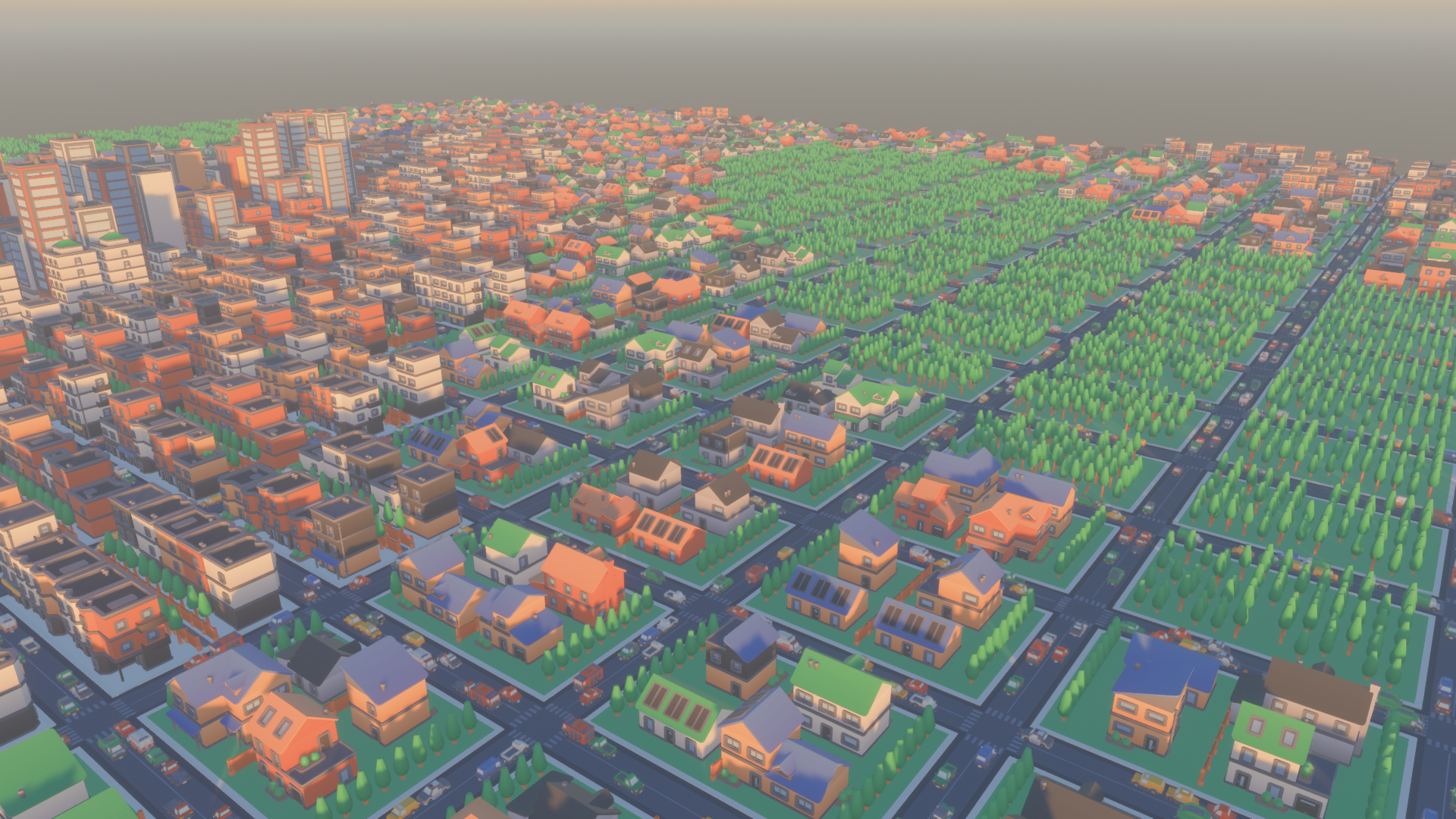
| Static | Moving | |
|---|---|---|
| Bevy 0.18 | 19.3 ms | 22.1 ms |
| Bevy 0.19 | 11.8 ms | 16.2 ms |
We accomplished these wins across many changes. They can be summarized as "we moved more things to the GPU, more batched rendering, parallelized more things, and reduced memory accesses".Click here for a breakdown of each optimization!
many_lights benchmark, this improved light clustering performance by about 20x!many_morph_targets example, this resulted in an almost 2x speedup!NoCpuCulling optimizations: Meshes with NoCpuCulling are now ignored by the CPU visibility systems entirely, which saves a significant amount of work for meshes with that marker component.encase library to prepare data for GPU buffers in the layout WGSL expects. In practice, this isn't always needed and incurs unnecessary overhead. We've swapped to cheaper direct memory copies when clustering lights to shave of a bit of time.bevymark_3d
Solari Improvements #
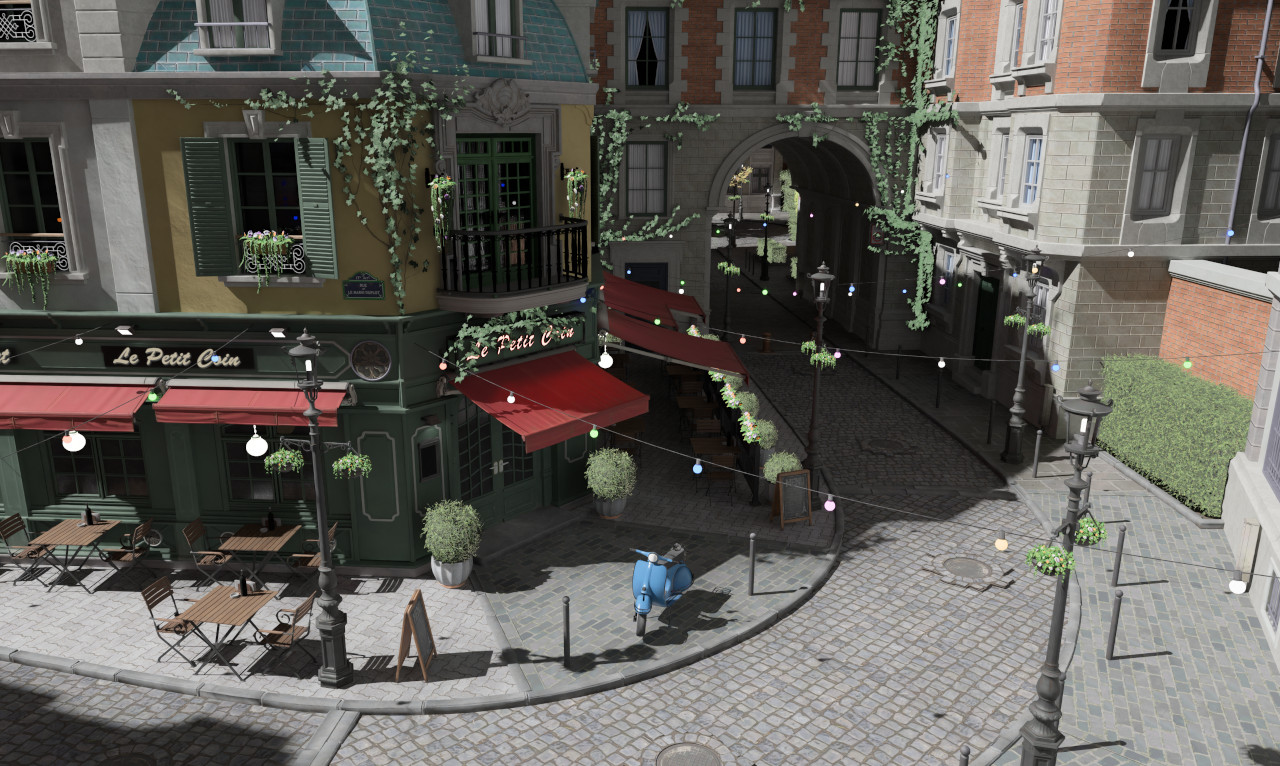
Solari, Bevy's realtime pathtraced renderer, has gained several improvements and fixes for mirrors and non-metallic materials, performance improvements, and greatly increased temporal stability.
For more details, read JMS55's blog post.
More Feathers Widgets #
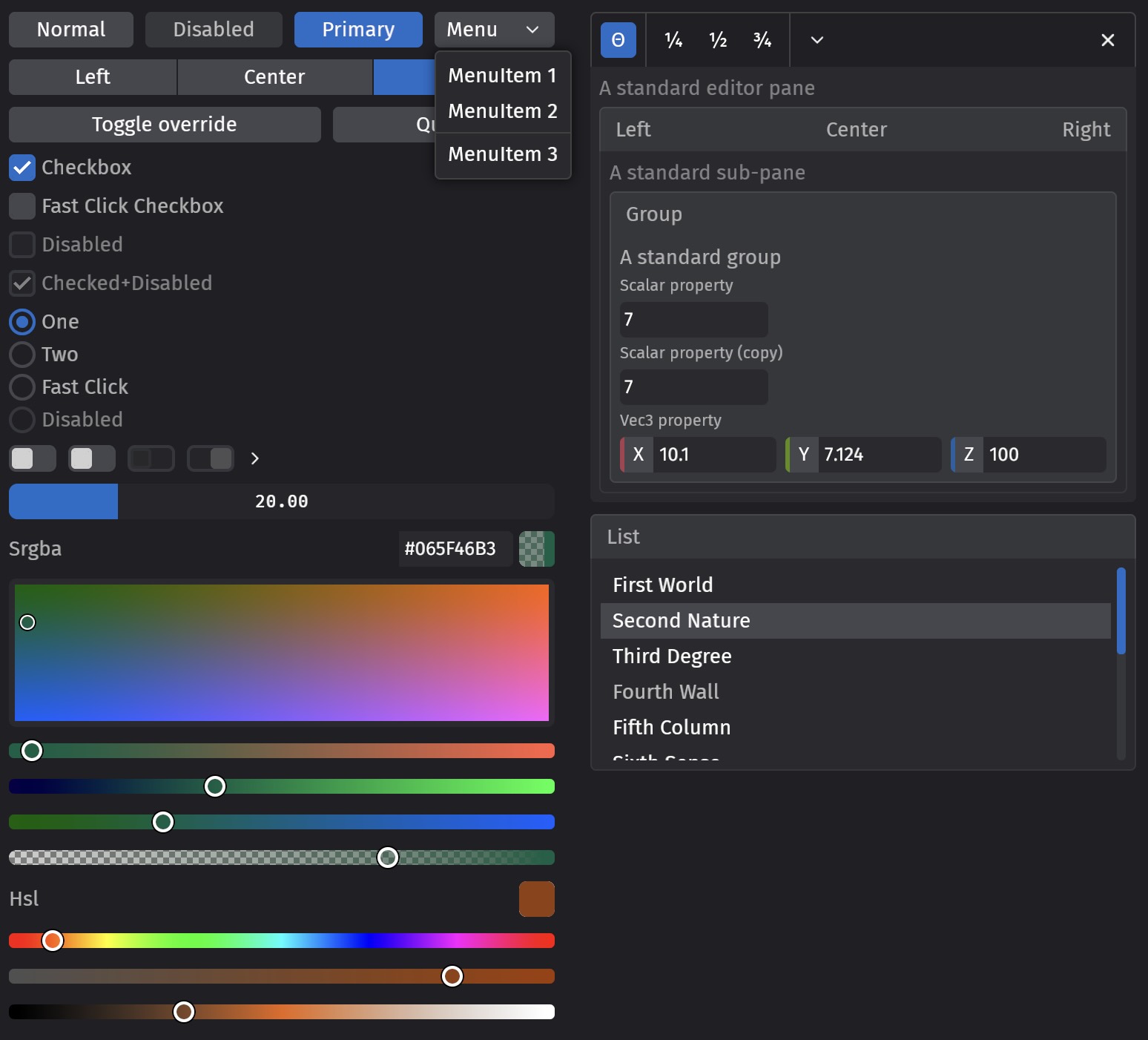
Bevy Feathers, our opinionated UI widget collection designed with the Bevy editor in mind, has added several new widgets this cycle:
- Text input
- Number input
- Dropdown menu button and menu divider
- Disclosure toggle (chevron expand/collapse)
- Icon and label (display primitives)
- Pane, subpane, and group (decorative frames for editors)
- List view
- Scrollbar
We've improved the existing widgets! For full usage and an interactive demo, try out the feathers_gallery example.
Feathers + BSN = ❤️ #
The Feathers widgets have migrated to BSN, Bevy's next-generation scene system. BSN is a better foundation for widgets than the old spawn-function approach: it reduces boilerplate, lets you compose widgets together, parameterize widgets with SceneComponent props, reference font/image assets, and register observers in the same declaration.
// Before: label children passed as a generic argument, observer wired separately
commands.spawn(checkbox_bundle(
    MyCheckbox,
    children![(Text::new("Enable shadows"), ThemedText)],
)).observe(|change: On<ValueChange<bool>>, mut config: ResMut<ShadowConfig>| {
    config.enabled = change.value;
});

// After: caption, extra components, and observer all defined in one call
bsn! {
    @FeathersCheckbox {
        @caption: bsn! { Text("Enable shadows") ThemedText }
    }
    MyCheckbox
    on(|change: On<ValueChange<bool>>, mut config: ResMut<ShadowConfig>| {
        config.enabled = change.value;
    })
}
In the future, the same BSN syntax used in the bsn! macro will be portable to .bsn files, letting devs choose and rapidly swap between code-first and asset-driven workflows when defining UI.
Text Input #
In Bevy 0.19, we've added basic support for text entry, in the form of the EditableText component. Spawning an entity with this component will create a simple unstyled rectangle of editable text. Our initial text entry supports:
- Typing: Press keys on your keyboard, get text (wow!)
- Cursor navigation: arrow keys, Home/End, and word-level shortcuts (Ctrl/Alt+arrow)
- Selection: Shift+arrow extends by character or word; click and drag with the pointer
- Multi-click: double-click to select a word, triple-click to select the whole line
- Backspace and Delete: Both for single characters and words
- Clipboard: uses the OS clipboard with the
system_clipboardfeature enabled, or an in-app buffer without it - Unicode-aware navigation and editing: 1 byte/char != 1 character
- Bidirectional text: allows both left-to-right and right-to-left scripts
- IME (Input Method Editor) support: for CJK and other composing scripts
- Multiline support: newlines, soft-wrapping, and vertical scrolling
- Horizontal scrolling: when content exceeds the visible width
- Per-character input filtering: via
EditableTextFilter - Optional select-all on focus: via the
SelectAllOnFocuscomponent - Max character limits: via
EditableText::max_characters
Many important features are currently unimplemented (placeholder text, undo-redo, password masking...). While we've been careful to expose and document the internals so that you can readily implement these features in your own projects, we would like to continue to expand the functionality of the base widget. Please consider making a PR!
To see how to use it in practice, check out our new text_input.rs example.
Contact Shadows #
Drag this image to compare
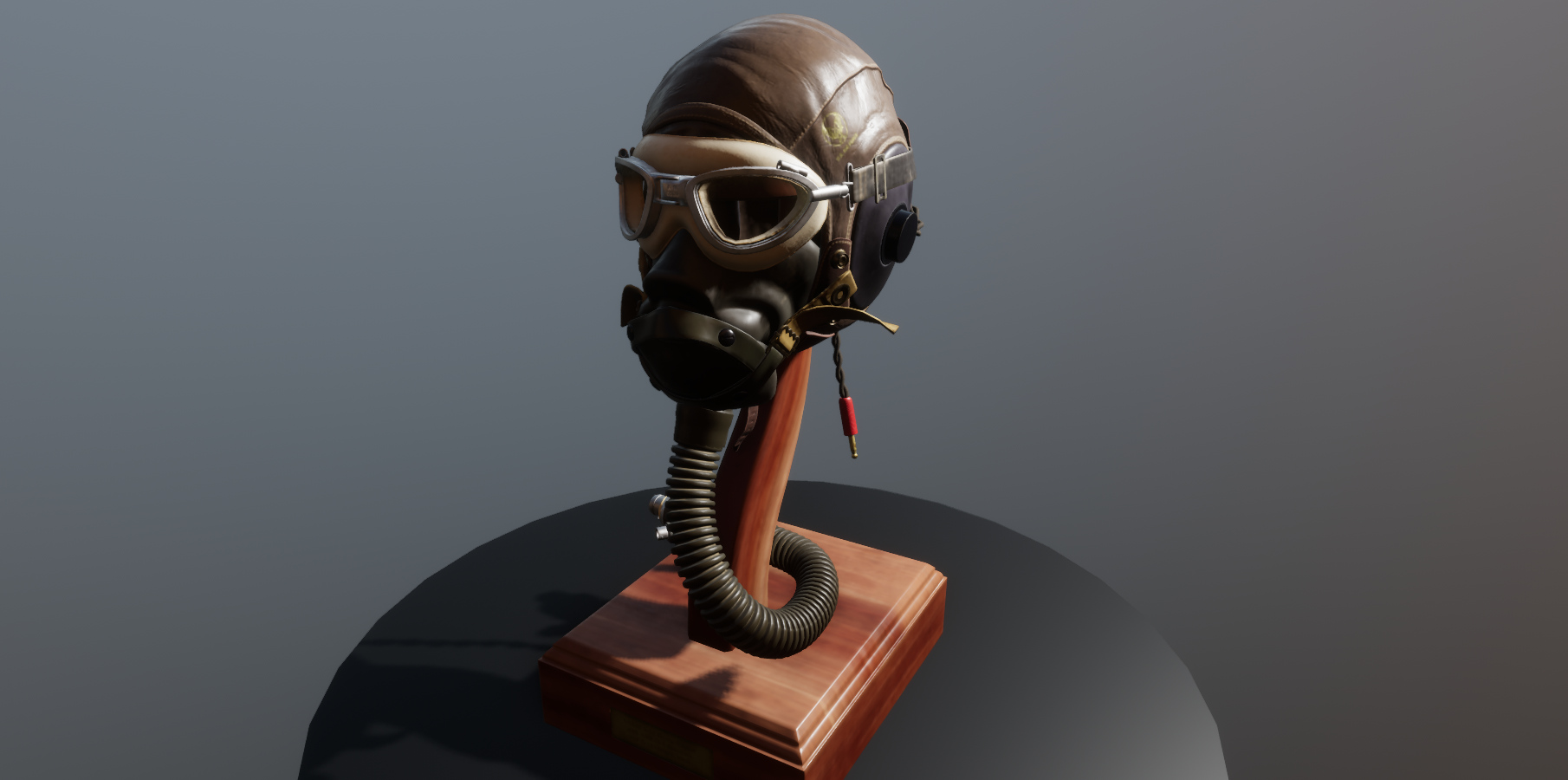
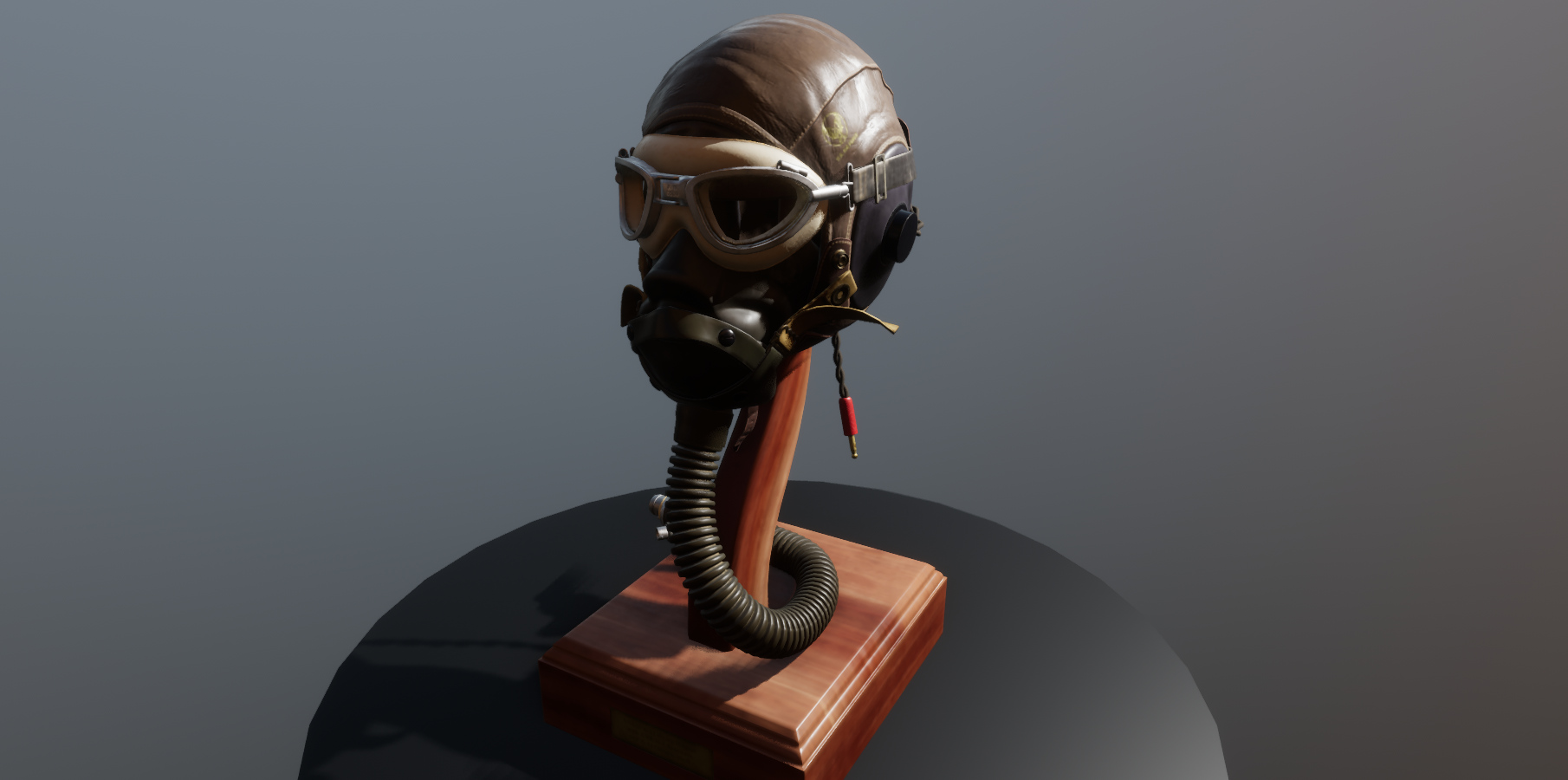
Bevy 0.19 introduces contact shadows, which help shadows capture the details of objects and attach properly to nearby surfaces.
Previously, Bevy's shadows (outside of Solari) were rendered entirely using (cascaded) shadow maps. Shadow mapping is a solid, standard technique that works by looking at objects in the scene from the perspective of the light, creating a depth map, then using that to determine which objects should be in shadow. Unfortunately, this technique is fundamentally limited by the resolution of the shadow map textures created, and it only produces good results when the distance between the shadow casting object and the surface it is casting a shadow on is relatively large.
Up close, you either get peter-panning (where the object seems to float above the ground due to a disconnected shadow), or shadow acne (where the shadows self-intersect in unrealistic ways), depending on what your depth bias is set to. Increasing the resolution of the shadow maps changes what "close" means, but the memory cost is prohibitive. You simply cannot get good short-range shadows with shadow maps alone. You need a complementary solution.
Contact shadows fill that gap. The core idea here is to perform a short-range (and thus affordable) screen-space raycast, tracing a line from surfaces towards lights, checking for nearby occluding objects.
The results are striking: shadows cling to surfaces properly, emphasizing subtle curves in a way that brings objects and characters to life.
Contact shadows are currently supported for directional, point and spot lights. They are toggled per light, and the cost of rendering contact shadows scales with the number of pixels on screen lit by lights with contact shadows enabled, multiplied by the number of such lights. To enable contact shadows for a light, set the contact_shadows_enabled field on your light components to true, and add the ContactShadows component to your camera. Tuning values on that component controls how contact shadows are computed across the scene.
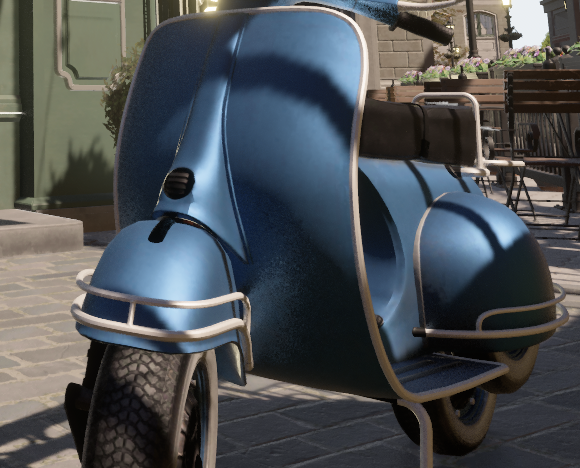
Physically Based Screen Space Reflections #
Bevy's screen space reflections now use a "physically based" algorithm, which improves the quality of our reflections significantly!
Rectangular Area Lights #
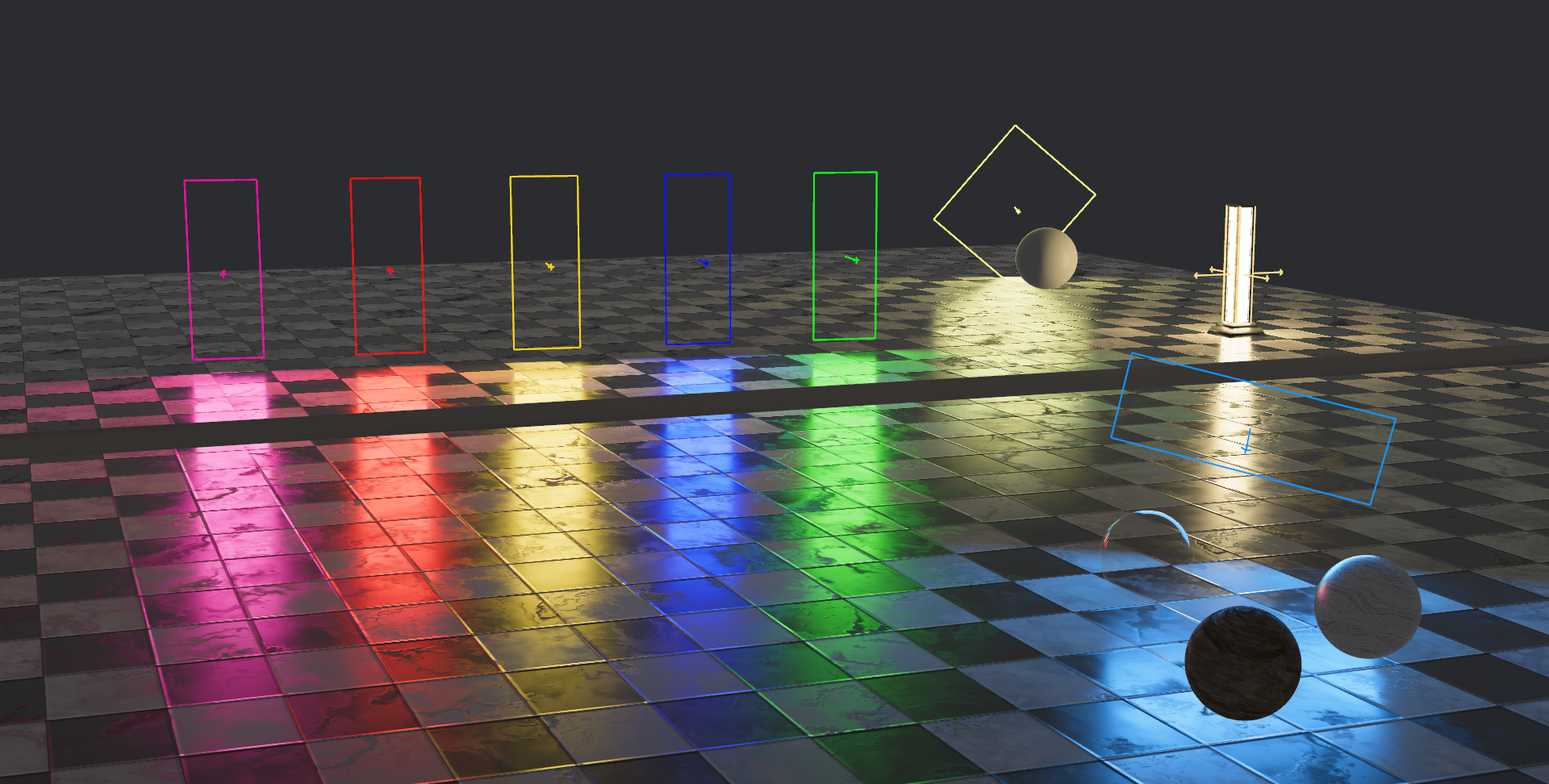
Bevy's lighting toolkit just got a new addition: rectangular area lights!
The implementation uses Linearly Transformed Cosines, which is the standard method for real-time area lights and should also help make our spherical area lights more accurate in the near future.
Rectangular lights currently don't cast shadows or have support for anisotropic materials.
You need to enable the area_light_luts cargo feature to use it.
Check out the new example to see them in action.
Richer text #
Bevy's text system has historically been sparse: pick a font by asset handle, set a size in pixels, done. Want bold? Load a separate bold font asset. Want italic? Another asset. Want the user's system monospace? No luck. Want text that scales with the viewport? Roll it yourself.
Not anymore.
Better font selection #
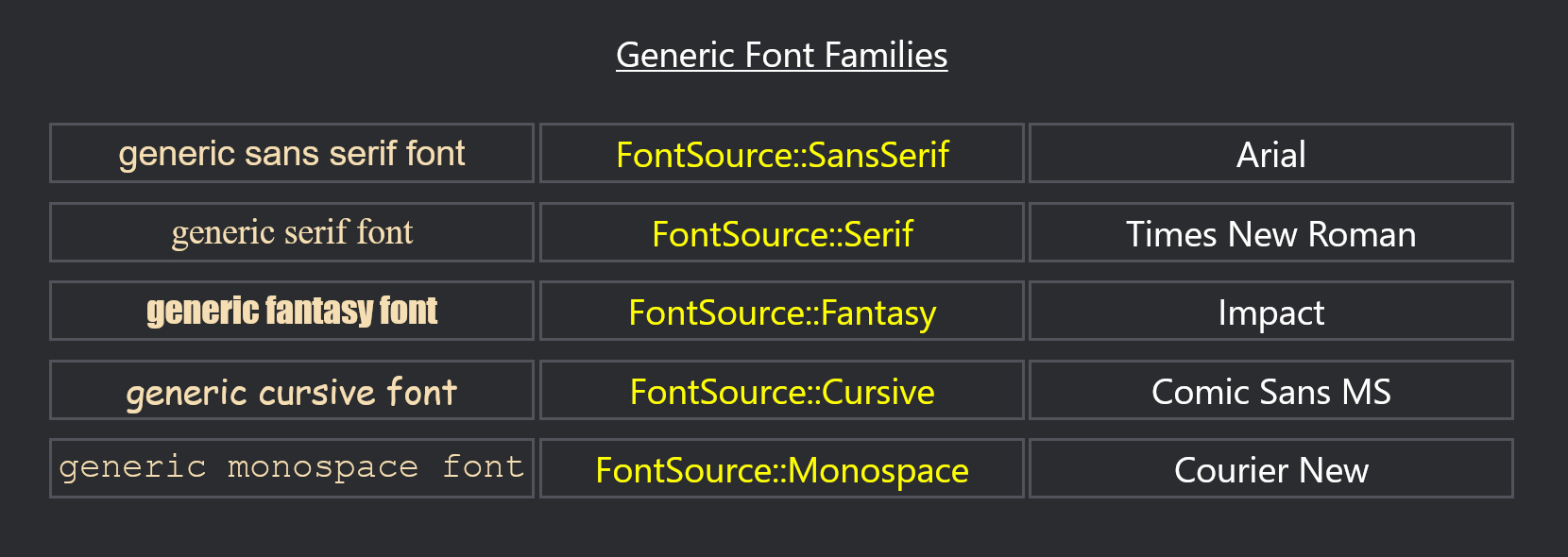
FontSource now offers three ways to identify a font:
// Asset handle
FontSource::Handle(asset_server.load("fonts/FiraMono.ttf"))

// Family name
FontSource::Family("FiraMono".into())

// Semantic category
FontSource::Monospace
The generic variants — Serif, SansSerif, Cursive, Fantasy, Monospace, and several UI-specific ones (SystemUi, Emoji, Math, and others) — resolve to configurable defaults. Override them via FontCx:
fn configure_fonts(mut font_cx: ResMut<FontCx>) {
    font_cx.set_serif_family("Merriweather");
    font_cx.set_monospace_family("JetBrains Mono");
}
Editor tooling and non-game applications that want to respect the user's font preferences without hardcoding an asset path will find this particularly useful.
System fonts were already loadable via the backend resource in previous releases, but FontSource::Family is a cleaner, more powerful way to load them. Enable the bevy/system_font_discovery feature to make installed system fonts available by name; without it, FontSource::Family("...") will only find fonts explicitly loaded as Bevy assets.
Variable font properties #
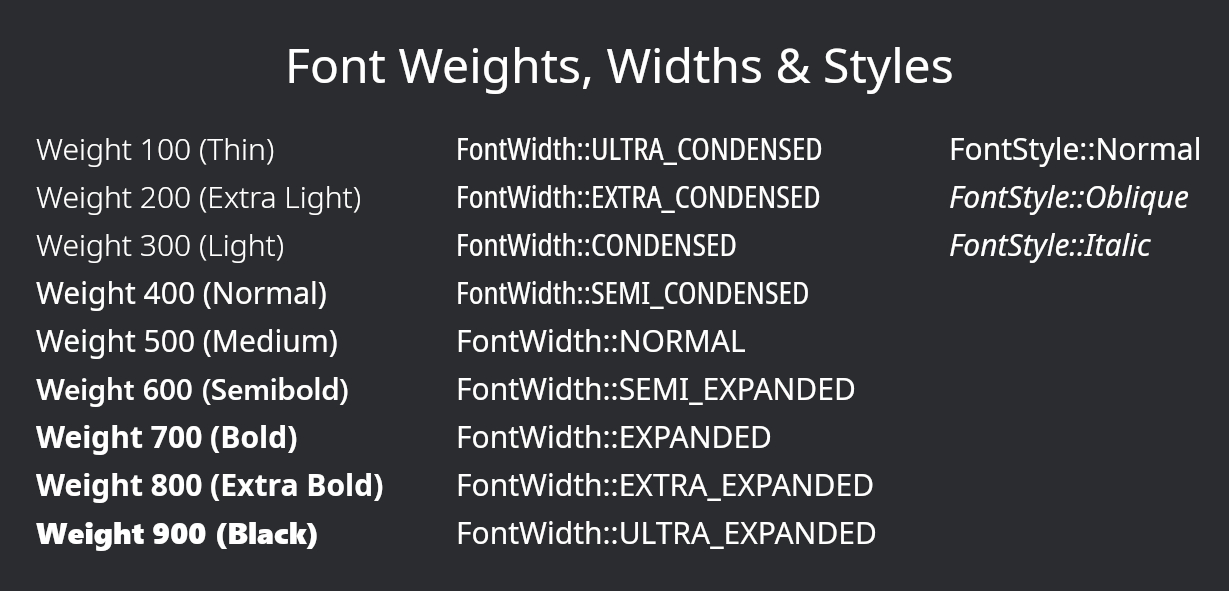
TextFont has gained the weight, width, and style fields. Pick a variable font, and say goodbye to separate assets for every variant of a typeface:
TextFont {
    font: FontSource::SansSerif,
    weight: FontWeight::BOLD,
    style: FontStyle::Italic,
    width: FontWidth::CONDENSED,
    ..default()
}
Responsive font sizing #
font_size is now a FontSize enum rather than a bare f32:
TextFont::from_font_size(FontSize::Px(24.0))   // fixed pixels — unchanged behavior
TextFont::from_font_size(FontSize::Vh(5.0))    // 5% of viewport height
TextFont::from_font_size(FontSize::Rem(1.5))   // relative to the RemSize resource
The full set of variants mirrors CSS: Px, Vw, Vh, VMin, VMax, and Rem. Rem values scale with the RemSize resource, giving you a single knob to resize all relative text at once.
Letter spacing #
A new LetterSpacing component controls the spacing between characters:
commands.spawn((
    Text::new("SPACED OUT"),
    LetterSpacing::Px(4.0),
));
While all of these features would have been possible in cosmic_text, we've chosen to migrate to parley during this cycle. Both are solid, modern choices, but we found parley had meaningfully better documentation and was somewhat nicer to use.
App Settings #
Bevy now has a built in general-purpose "app settings" system, which Bevy apps can use to load and save arbitrary settings such as:
- Graphics options
- Panel layouts and tool preferences
- Music and sound volume controls
- Window position and size
- "Don't show this dialog again"
Notably, the Bevy Editor needs a settings system for layout preferences, tool configuration, and everything else that should persist between sessions. Because the Bevy Editor is being built as a Bevy app, it can make use of this new settings system!
Settings groups are plain Rust structs that derive Resource, SettingsGroup, and Reflect:
#[derive(Resource, SettingsGroup, Reflect, Default)]
#[reflect(Resource, SettingsGroup, Default)]
struct AudioSettings {
    music_volume: f32,
    sfx_volume: f32,
}
Adding SettingsPlugin with a unique reverse-domain app name will automatically load your settings groups on startup and insert them as resources:
app.add_plugins(SettingsPlugin::new("com.example.mygame"));You can then read them like any other resource:
fn adjust_volume(audio: Res<AudioSettings>, mut music: ResMut<AudioSink>) {
    music.set_volume(audio.music_volume);
}
Settings can then be saved via the SaveSettingsDeferred or SaveSettingsSync command.
See the settings.rs example for a complete walkthrough.
A special thanks to Andhrimnir (@tecbeast42) for giving Bevy ownership of the bevy-settings crate name on crates.io. We built our own brand new settings crate, but we're re-using the bevy-settings crate name because it fits the best.
More Post-Processing Effects #
Two new post-processing effects were added in this cycle, both classic tools for giving your camera a more cinematic or stylized look.
Vignette #
Drag this image to compare
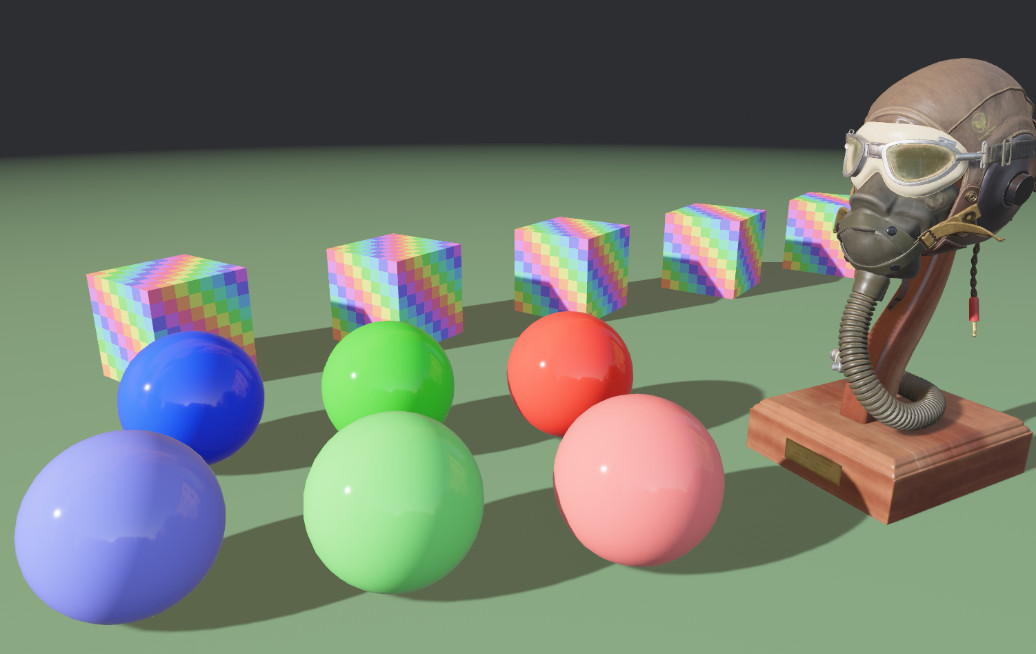
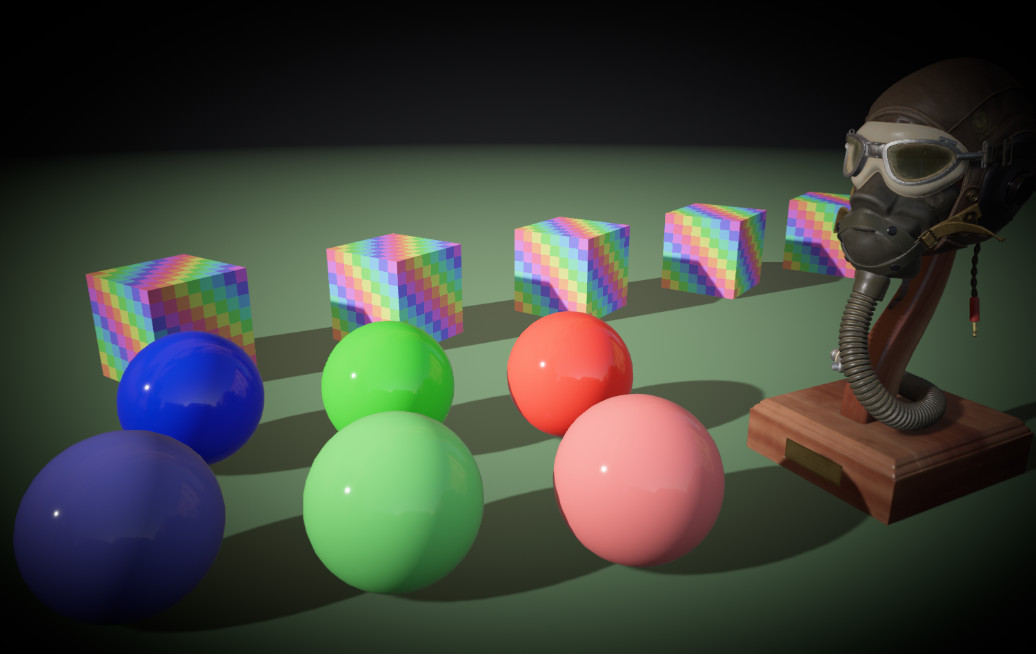
Vignette reduces image brightness towards the periphery of the frame, drawing the viewer's eye to the center.
commands.spawn((
    Camera3d::default(),
    Vignette {
        intensity: 1.0,
        radius: 0.75,
        smoothness: 5.0,
        roundness: 1.0,
        center: Vec2::new(0.5, 0.5),
        edge_compensation: 1.0,
        color: Color::BLACK,
    },
));
Lens Distortion #
Drag this image to compare
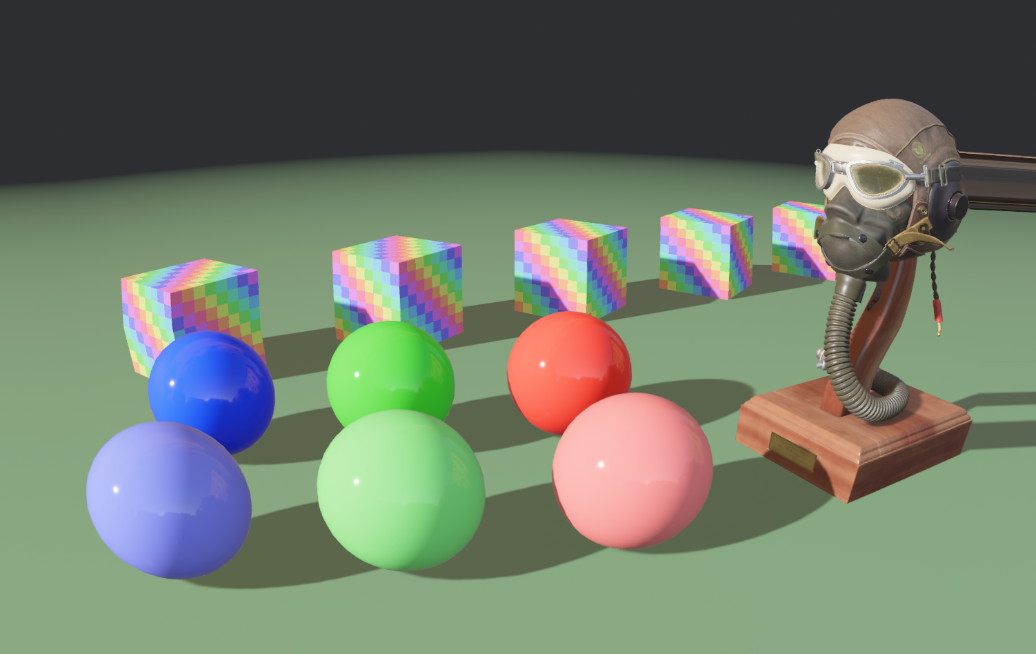
Drag this image to compare
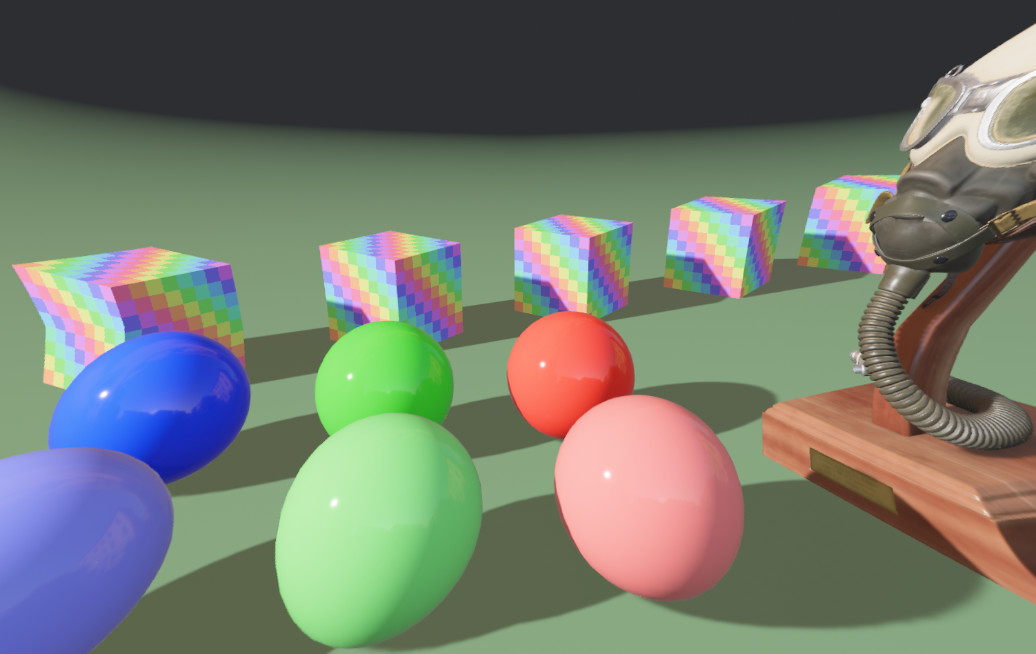
Lens distortion warps the image spatially. Positive intensity pushes the edges outward (barrel distortion), negative pulls them inward (pincushion distortion).
commands.spawn((
    Camera3d::default(),
    LensDistortion {
        intensity: 0.5,
        scale: 1.0,
        multiplier: Vec2::ONE,
        center: Vec2::splat(0.5),
        edge_curvature: 0.0,
    },
));
Render Recovery #
GPU errors previously had no recovery path — a driver crash, an out-of-memory condition, or a device loss would silently hang or crash the app. This was particularly frustrating in long-lived applications (like art installations) or on devices with frequent failures, such as VR headsets. Bevy now surfaces these as typed errors and lets you decide what to do with each one:
use bevy::render::error_handler::{ErrorType, RenderErrorHandler, RenderErrorPolicy};

app.insert_resource(RenderErrorHandler(
    |error, main_world, render_world| match error.ty {
        ErrorType::DeviceLost => RenderErrorPolicy::Recover(default()),
        ErrorType::OutOfMemory => RenderErrorPolicy::StopRendering,
        ErrorType::Validation => RenderErrorPolicy::Ignore,
        ErrorType::Internal => panic!(),
    },
));
DeviceLost is the case most games will want to handle: it covers GPU driver crashes, thermal shutdowns, and hardware being physically disconnected. RenderErrorPolicy::Recover reinitializes the renderer and keeps the app running. StopRendering halts rendering but leaves the rest of the app alive — useful if you want to show an error screen or save state before exiting. Ignore silently swallows the error, which is the existing behavior for validation errors. Panicking remains appropriate for Internal errors, which indicate bugs.
Be sure to test your error recovery carefully in your games; we've seen hardware-specific cases of flickering during repeated failures (as might be caused by an out-of-memory problem), which are a serious accessibility risk for people with photosensitive epilepsy. While we're looking to solve that problem for good in later releases, we've currently opted for a conservative default. If you don't configure a RenderErrorHandler, behavior is similar to but not identical to before: Vulkan validation errors are ignored, everything else sends an AppExit event to gracefully shut down.
Render Graph as Systems #
Bevy's RenderGraph architecture has been replaced with ECS schedules. Render passes are now regular systems that run in schedules such as Core3d, Core2d, which are executed on the render world.
The old render graph was originally designed when Bevy's ECS was less mature. In order to add custom rendering functionality, we required users to implement a trait Node, derive a RenderLabel, and use a targeted API for ordering this rendering work relative to other tasks. This required a lot of boilerplate!Click here to see what it used to look like!
pub struct MyCustomRenderNode;

impl Node for MyCustomRenderNode {
    fn run(
        &self,
        _graph: &mut RenderGraphContext,
        render_context: &mut RenderContext,
        world: &World,
    ) -> Result<(), NodeRunError> {
        let res_a = world.resource::<Res<A>>();
        let encoder = render_context.command_encoder();

        // do some rendering things

        Ok(())
    }
}

#[derive(RenderLabel, Debug, Hash, PartialEq, Eq, Clone)]
pub struct MyCustomRenderNodeLabel;

pub struct MyRenderPlugin;

impl Plugin for MyRenderPlugin {
    fn build(&self, app: &mut App) {
        let Ok(render_app) = app.get_sub_app_mut(RenderApp) else {
            return;
        };

        render_app
            .add_render_graph_node::<ViewNodeRunner<MyCustomNode>>(
                Core3d,
                MyCustomRenderNodeLabel
            )
            .add_render_graph_edge(
                Core3d,
                Node3d::MainPass,
                MyCustomRenderNodeLabel
            );
    }
}
As Bevy ECS has evolved, Schedule has become capable of expressing the "render graph" pattern. Using the ECS directly lets rendering better leverage familiar Bevy patterns, allowing the above to be expressed much more succinctly:
fn my_custom_render_system(mut ctx: RenderContext, res_a: Res<A>) {
    let encoder = ctx.command_encoder();
    // do some rendering things
}

pub struct MyRenderPlugin;

impl Plugin for MyRenderPlugin {
    fn build(&self, app: &mut App) {
        let Ok(render_app) = app.get_sub_app_mut(RenderApp) else {
            return;
        };

        render_app
            .add_systems(Core3d, my_custom_render_system.after(Core3dSystems::MainPass));
    }
}
In the future, expressing rendering work as systems will allow us to explore performance optimizations that take advantage of the ECS. For example, future work to support read-only schedules could help parallelizing command encoding by enforcing that a schedule does not mutate the world. We are excited to continue to improve the experience of custom rendering inside Bevy!
Improved Skinned Mesh Culling #
In earlier Bevy versions, animated characters and creatures would sometimes vanish mid-animation. This happened because Bevy used the skeleton's resting position to decide which meshes were on-screen, rather than their actual animated pose. A character raising their arms could have those arms literally outside the bounding box Bevy used for culling.
Skinned meshes now compute their bounds from actual joint positions each frame, fixing disappearing meshes like those reported in #4971. If you load skinned meshes from glTFs, this is automatic — no changes needed.
For hand-crafted skinned meshes, call Mesh::generate_skinned_mesh_bounds and add DynamicSkinnedMeshBounds to the entity:
let mut mesh: Mesh = ...;
mesh.generate_skinned_mesh_bounds()?;

entity.insert((
    Mesh3d(meshes.add(mesh)),
    DynamicSkinnedMeshBounds,
));
Parallax Corrected Cubemaps #
Drag this image to compare
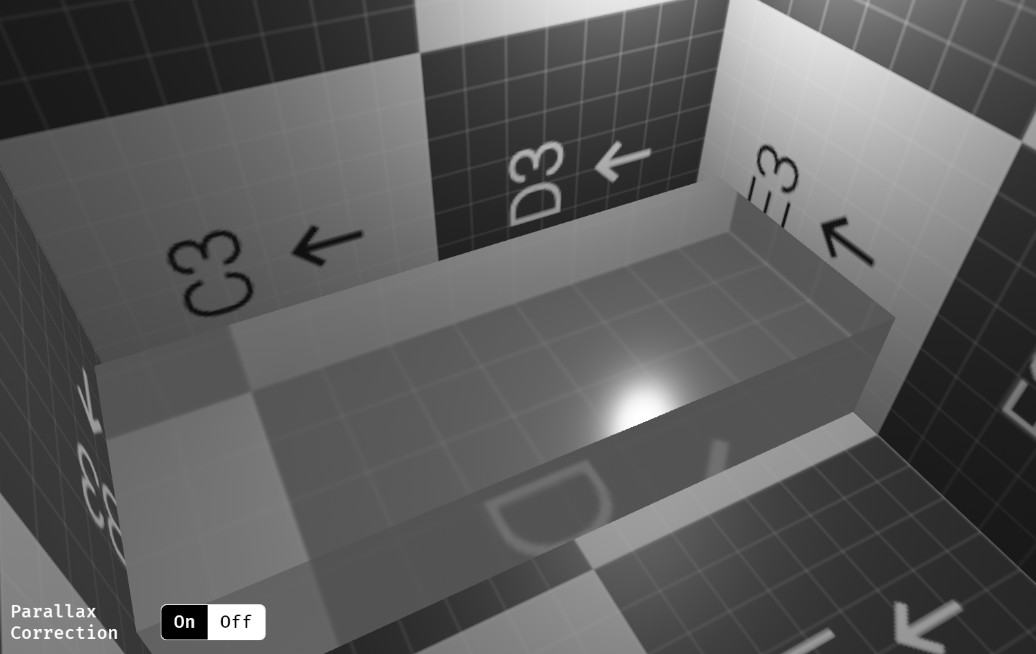
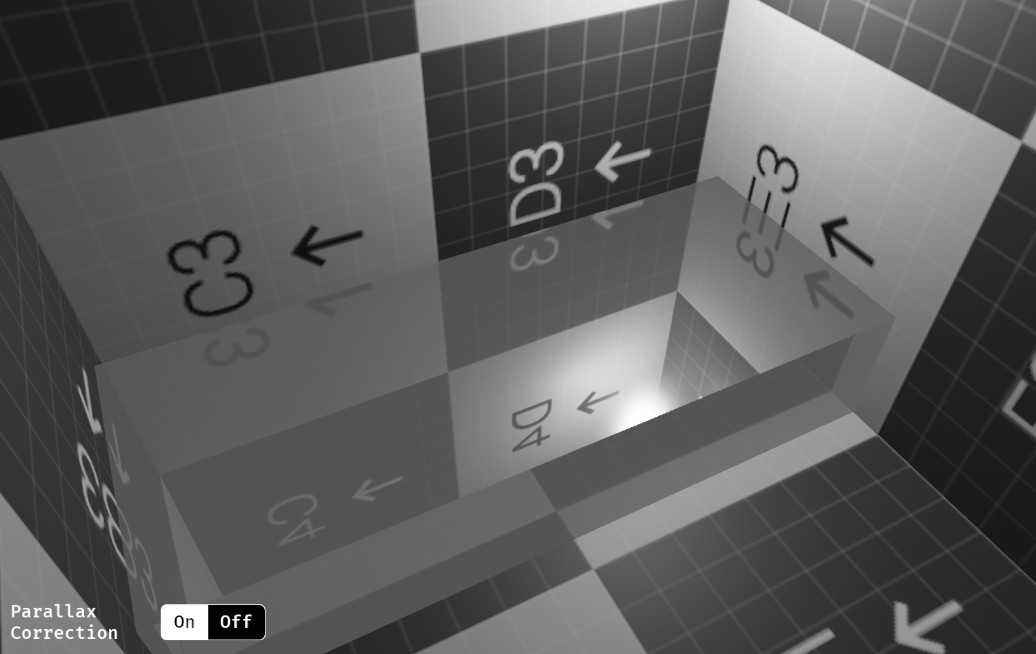
Bevy previously rendered cubemap reflections as though the environment were infinitely far away. For outdoor scenes this was often fine, but for indoor scenes and dense environments the result looked wrong — reflections didn't line up with the actual geometry around the viewer.
The standard fix is parallax correction: each reflection probe gets its own bounding box, and a raytrace against that box determines the correct sampling direction for the cubemap. Bevy now applies this automatically for light probes, using the probe's influence bounding box as the correction volume. This is a reasonable default for a cubemap capturing a rectangular room interior, and matches Blender's approach.
Parallax correction is enabled by default. To opt out on a specific probe, add ParallaxCorrection::None:
commands.spawn((
    LightProbe,
    EnvironmentMapLight { .. },
    ParallaxCorrection::None,
));
A new pccm example demonstrates the effect, with parallax correction toggleable at runtime.
Partial Bindless / Reduced Bind Group Overhead #
Bindless rendering is how modern engines handle scenes with many different materials efficiently: shaders index into shared pools of textures and buffers rather than rebinding them each draw call.
WGPU's backend for Metal (Apple's GPU API) has partial bindless support. It currently only permits texture binding arrays but not buffer binding arrays.
Historically, Bevy required support for both features before it would use bindless, which excluded Metal entirely, even for materials that never use buffer arrays.
Most materials, including StandardMaterial, do not need buffer array support. To ensure those materials take the fast path, Bevy now checks the actual needs of each material. If you only need texture arrays, your material can be rendered efficiently across Bevy's desktop platforms. If you use #[uniform(..., binding_array(...))], expect performance degradation on Metal.
We've also fixed two important correctness bugs in the process:
- We discovered that the sampler limit check was testing the wrong metric:
max_samplers_per_shader_stagecounts binding slots, but the relevant limit ismax_binding_array_sampler_elements_per_shader_stage, the array element count (a mismatch that could incorrectly disable bindless). - Bevy now also skips creating binding array slots for resource types a material doesn't use, staying within Metal's hard 31 argument buffer slot limit and reducing overhead on all platforms.
Benchmarked on Bistro Exterior (698 materials) we saw significant frame time improvements (and sometimes memory improvements) across many hardware configurations:
| GPU | Frame Time Speedup | Memory |
|---|---|---|
| Apple M2 Max (Metal) | +15% | −57 MB RAM |
| NVIDIA 5060 Ti | +46% | Same |
| AMD Vega 8 / Ryzen 4800U | Same | −88 MB VRAM |
| Intel i360P | +14% | Same |
| Intel Iris XE | Same | Same |
Bistro is a demanding, fairly realistic scene. While bindless limitations remain frustrating, especially on Mac where Vulkan isn't an option, it's lovely to see those performance gains, and to know that Bevy itself is no longer artificially holding our users back.
Diagnostics Overlay #
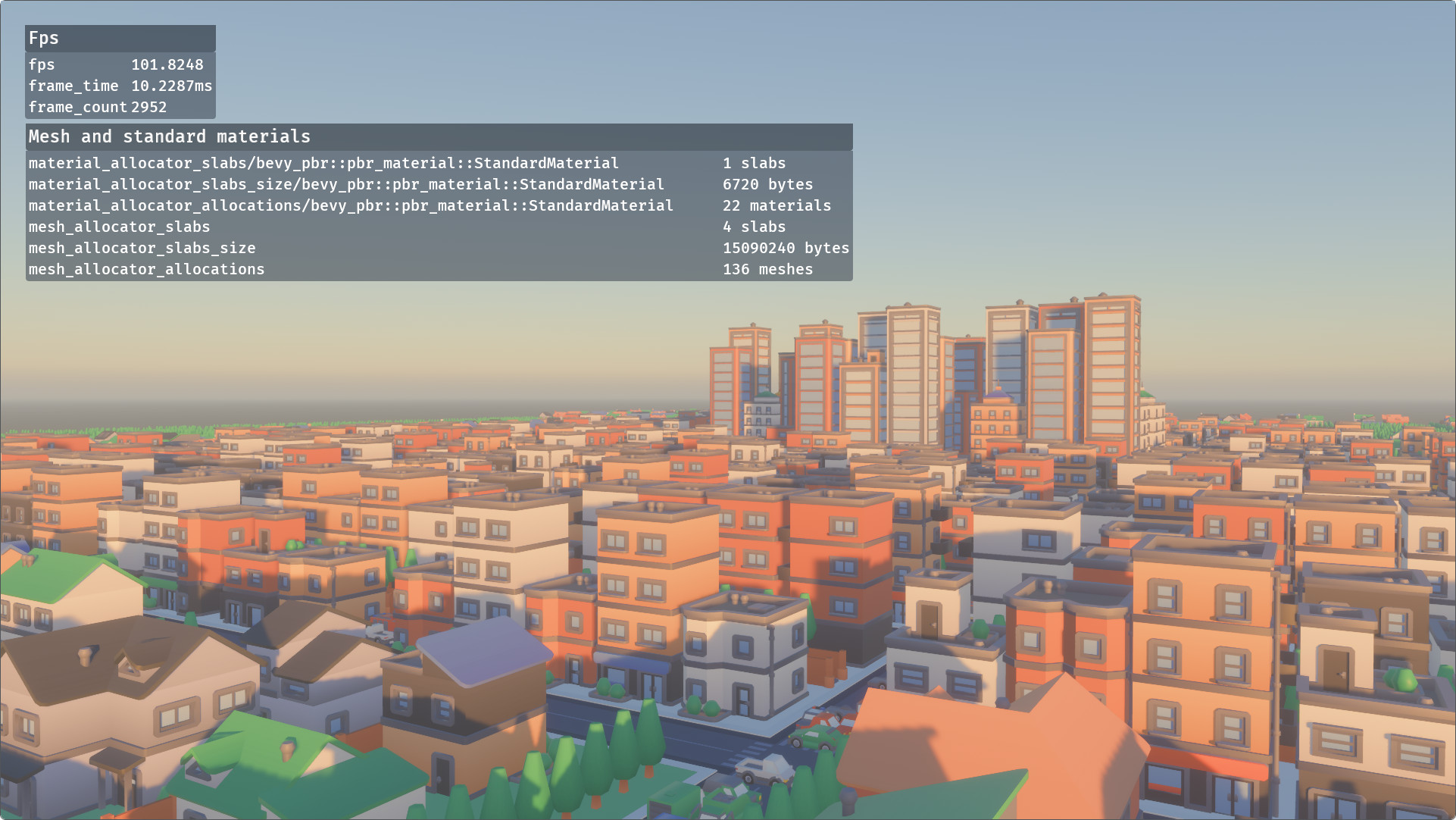
Bevy's diagnostics have always been easy to dump to the terminal, but displaying them in-game meant wiring up your own UI. DiagnosticsOverlayPlugin adds a built-in overlay for this, with presets for common cases:
commands.spawn(DiagnosticsOverlay::fps());
commands.spawn(DiagnosticsOverlay::mesh_and_standard_material());
You can also build a custom overlay from any DiagnosticPath list:
commands.spawn(DiagnosticsOverlay::new("Diagnostics", vec![
    MyDiagnostics::COUNTER.into()
]));
By default the overlay shows the smoothed moving average. You can switch to the latest value or the raw moving average via DiagnosticsOverlayStatistic, and configure floating-point precision with DiagnosticsOverlayItem::precision:
commands.spawn(DiagnosticsOverlay::new("Diagnostics", vec![DiagnosticsOverlayItem {
    path: MyDiagnostics::COUNTER,
    statistic: DiagnosticsOverlayStatistic::Value,
    precision: 4,
}]));
Contiguous Query Access #
SIMD is a critical tool for performance optimization, but using it in Bevy has always been harder than it needed to be. Table components in Bevy are already laid out flat in memory — all Transform components are stored as values in a contiguous table, exactly what SIMD wants. The Query iterator just wasn't exposing that structure: it handed you one entity's component at a time, and the compiler had no way to know the underlying data was a contiguous array.
contiguous_iter and contiguous_iter_mut hand you the whole table slice at once. LLVM can see the contiguous array and auto-vectorize — or you can reach for explicit SIMD yourself.
On a bulk position += velocity update over 10,000 entities, this gives some serious speedups:
| Method | Time | Time (AVX2) |
|---|---|---|
| Normal iteration | 5.58 µs | 5.51 µs |
| Contiguous iteration | 4.88 µs | 1.87 µs |
| Contiguous, no change detection | 4.40 µs | 1.58 µs |
If your project has CPU-heavy workloads (physics engines are a prime example), you should try this out immediately.
fn apply_health_decay(mut query: Query<(&mut Health, &HealthDecay)>) {
    for (mut health, decay) in query.contiguous_iter_mut().unwrap() {
        for (h, d) in health.iter_mut().zip(decay) {
            h.0 *= d.0;
        }
    }
}
The contiguous_iter family of methods only returns Ok if the query is dense. That means:
- All of the fetched components must use the default "table" storage strategy.
- The query filters cannot disrupt the returned query data. "Archetypal filters" like
With<T>andWithout<T>are fine;Changed<T>andAdded<T>are not, since they require a per-entity check that makes it impossible to return raw table slices.
Because these conditions are fixed properties of the query type, you're safe to unwrap here unless you are writing generic code, or working with dynamic components.
You may have noticed that the table above had three rows. While change detection is a generally useful feature, it does incur measurable performance overhead. By default, contiguous_iter_mut returns ContiguousMut<T>. Just like the ordinary Mut<T>, it triggers change detection automatically on dereference. If you don't care about that, bypass_change_detection() gives you the raw &mut [T] directly for even faster access. Vroom!
Delayed Commands #
Scheduling things to happen some time in the future is a common and useful tool in game development for everything from gameplay logic to audio cues to VFX.
While this was previously possible through careful use of timers, getting the details right was surprisingly tricky and naive solutions were heavy on boilerplate.
Now, you can simply delay arbitrary commands to be executed later.
fn delayed_spawn(mut commands: Commands) {
    commands.delayed().secs(1.0).spawn(DummyComponent);
}

fn delayed_spawn_then_insert(mut commands: Commands) {
    let mut delayed = commands.delayed();
    let entity = delayed.secs(0.5).spawn_empty().id();
    delayed.secs(1.5).entity(entity).insert(DummyComponent);
}
Note that this does not have a built-in, blessed cancellation mechanism yet. We recommend embedding the originating Entity into the command if you want to cancel the action if that entity dies or is despawned.
Text Gizmos #

Sometimes you just want to slap a label on something while debugging. Text gizmos are for exactly that: a zero-setup way to draw world-space text anywhere in your scene using a built-in stroke font.
Unlike Bevy's Text2D — the right choice for damage numbers, nameplates, and in-game labels — text gizmos are strictly for dev tools and debugging. The font is fixed and only supports ASCII.
Use [Gizmos::text] and text_2d to quickly draw text:
fn draw_text(mut gizmos: Gizmos) {
    gizmos.text_2d(
        Isometry2d::IDENTITY, // Position and rotation of the text in world-space
        "Hello Bevy",         // Only supports ASCII text
        40.0,                 // Font size in screen-space pixels
        Vec2::ZERO,           // Anchor point, zero is centered
        Color::WHITE,         // Color of the text
    );
}
If you want to color each section of characters separately, reach for text_sections and text_sections_2d.
Cancellable Web Tasks #
When a Task in Bevy is dropped, it's supposed to be cancelled, stopping the underlying work at the next yield point. On web, this never worked. wasm_bindgen_futures::spawn_local hands your future directly to the JS event loop with no handle to take it back, so Bevy's task wrapper was just a receipt with no power to cancel.
As a result, code that correctly managed task lifetimes on native desktop and mobile platforms silently leaked work on web.
fn update_background_task(mut task_handle: ResMut<CurrentTask>) {
    // Replaces the old task. On native: the old task is dropped and cancelled.
    // On web: the old task kept running. Oops.
    task_handle.0 = AsyncComputeTaskPool::get().spawn(async { do_work().await });
}
Fixing this required a new approach to the WASM executor. The web-task crate, built by our very own @NthTensor, builds cooperative cancellation on top of the JS event loop: spawned tasks check an abort flag at every yield point. Bevy now uses it on WASM, so Task drop semantics are finally identical on all platforms.
Asset Saving #
Bevy has had an AssetSaver trait since 0.12. However, it was only ever intended for use inside asset processing pipelines, not for saving assets at runtime. This left a frustrating gap: if you wanted to save a procedurally generated mesh, a baked lightmap, or the output of an in-editor workflow, there was no supported path to do it.
Now there is. save_using_saver lets you save any asset to disk using an AssetSaver implementation of your choice.
1. Building the SavedAsset #
For simple assets with no sub-assets, use SavedAsset::from_asset:
let main_asset = InlinedBook {
    lines: vec!["Save me!".to_string(), "Please!".to_string()],
};
let saved_asset = SavedAsset::from_asset(&main_asset);
For assets that reference other assets (sub-assets), use SavedAssetBuilder:
let asset_path: AssetPath<'static> = "my/file/path.whatever".into();
let mut builder = SavedAssetBuilder::new(asset_server.clone(), asset_path.clone());

let subasset_1 = Line("howdy".into());
let subasset_2 = Line("goodbye".into());
let handle_1 = builder.add_labeled_asset_with_new_handle(
    "TheFirstLabel", SavedAsset::from_asset(&subasset_1));
let handle_2 = builder.add_labeled_asset_with_new_handle(
    "AnotherOne", SavedAsset::from_asset(&subasset_2));

let main_asset = Book {
    lines: vec![handle_1, handle_2],
};
let saved_asset = builder.build(&main_asset);
SavedAsset borrows rather than owns its assets. That means you can build and save in the same async block — no need to transfer ownership first.
2. Calling save_using_saver #
save_using_saver(
    asset_server.clone(),
    &MyAssetSaver::default(),
    &asset_path,
    saved_asset,
    &MySettings::default(),
).await.unwrap();
save_using_saver is async. Generally, you'll want to spawn it with IoTaskPool::get().spawn(...). You'll also need to implement AssetSaver for MyAssetSaver to define the serialization format.
Resources as Components #
Resources and components have always been separate concepts in Bevy's ECS. While the simple Res<Time> sugar is nice, the only real distinction is cardinality — a resource is a component of which at most one exists at any time.
That separation has been a persistent source of friction. Many of our tools for components (like hooks, observers, and relations) simply weren't available for resources, and the engine carried a significant amount of duplicated internal machinery to keep the two mechanisms in sync.
In Bevy 0.19, resources are now stored as components on singleton entities, unifying our internals and giving resources more capabilities. You can now:
- Simplify networking and dev-tools code by assuming that entities + components are the only form of data you need to worry about
- Query over both resources and components to support flexible usage patterns
- Add relationships pointing to and from resource entities
- Add additional components to your resource entities
- Add lifecycle observers to your resource types
- Add your own hooks to resources
- Mark resources as immutable
Remote Entity Reservation #
Bevy has historically required a World reference to allocate entity IDs. This works in most scenarios, but it means that if you want to do work in parallel that initializes entities, you need to block your app's execution! This is problematic for things like our upcoming "assets as entities" work, which will involve preparing entity contents in the background while the app continues to run.
Bevy 0.19 introduces a new entity allocation strategy that enables reserving entity IDs from any thread without a World reference and without compromising on performance. This involved splitting the entity lifecycle into five stages: unallocated, allocated, spawned, despawned, and freed.
Interactive Transform Gizmo #
A transform gizmo — the click-and-drag handles for translating, rotating, and scaling objects in a 3D viewport — is one of the first things anyone reaches for when building a level editor. Bevy now has one built in, for your use today and our own use in the future.
Add TransformGizmoPlugin, mark a camera with TransformGizmoCamera, and tag entities with TransformGizmoFocus:
app.add_plugins(TransformGizmoPlugin);

commands.spawn((Camera3d::default(), TransformGizmoCamera));
commands.spawn((Mesh3d(mesh), TransformGizmoFocus));
The plugin is deliberately not connected to user input. This keeps the gizmo composable for editor authors who already have opinions about input handling. Sensitivity, snapping, and screen-space scaling are all configurable via TransformGizmoSettings, while modes are controlled via the TransformGizmoMode resource.
Much of the math and implementation strategy for this widget comes from the bevy_transform_gizmo crate. Thanks again to Foresight Spatial Labs for their generous open source contributions!
Infinite Grid #
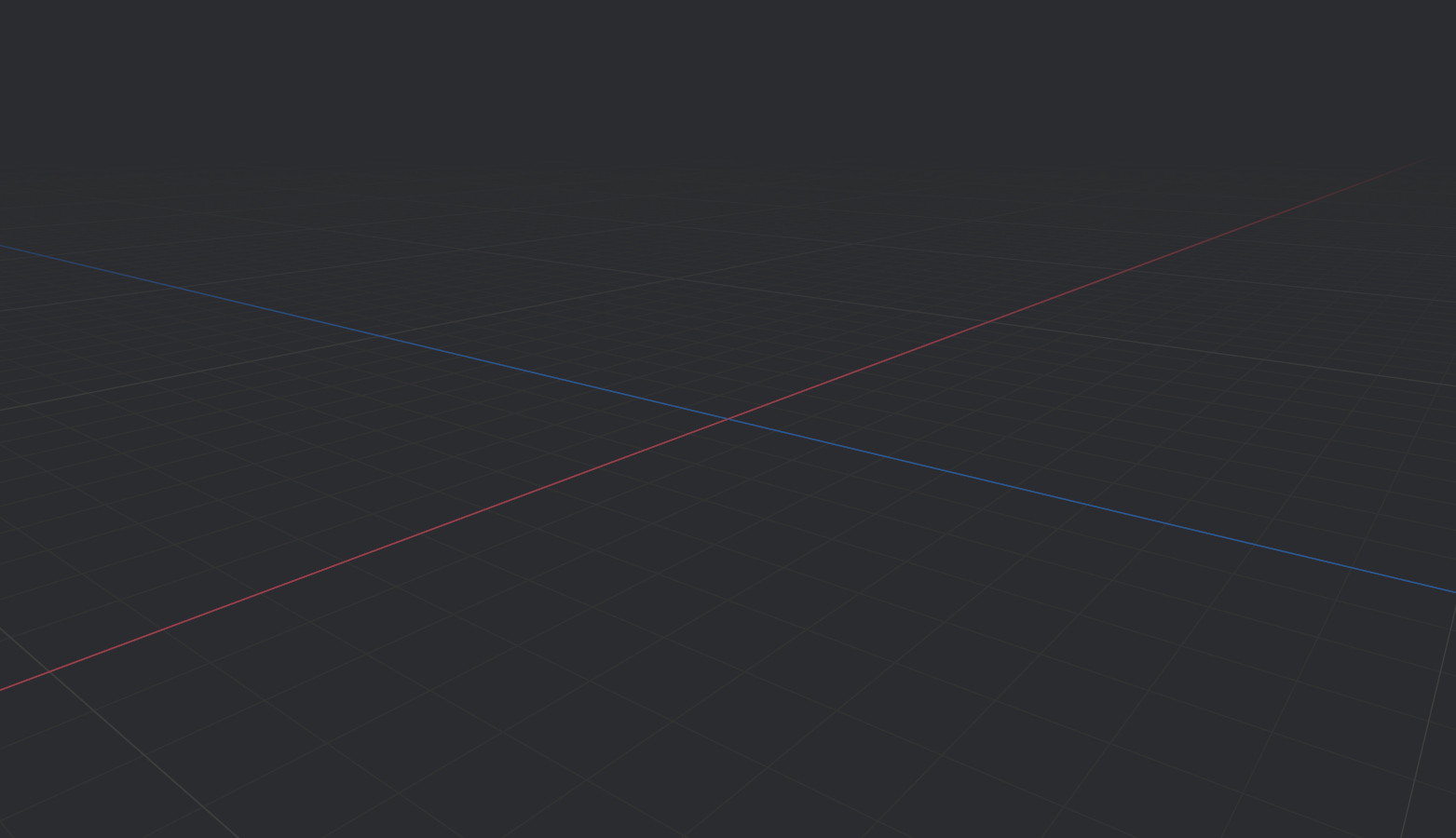
A transparent ground-plane grid is a staple of 3D editor tooling: it marks the major axes, orients the scene, and makes scale immediately legible.
Simply drawing lines doesn't work well: the mesh has to end somewhere, and the lines that reach toward the horizon create aliasing artifacts and Moiré patterns no matter how far you extend it.
Our implementation renders the grid as a fullscreen shader: the grid is computed per-pixel in screen space from the camera's perspective, and fades out with distance to eliminate aliasing at the horizon.
To add an infinite grid to your app, register InfiniteGridPlugin and spawn the InfiniteGrid component:
use bevy::dev_tools::infinite_grid::{InfiniteGrid, InfiniteGridPlugin};
use bevy::prelude::*;

App::new()
    .add_plugins((DefaultPlugins, InfiniteGridPlugin))
    .add_systems(Startup, setup)
    .run();

fn setup(mut commands: Commands) {
    commands.spawn(InfiniteGrid);
}
Grid appearance — colors, fade distance, line scale — is controlled by InfiniteGridSettings, which can be placed on the grid entity or on a specific camera to override it per-view. You can see how this works in the new infinite_grid.rs example.
This is an upstreamed version of the bevy_infinite_grid crate, created and maintained by Foresight Spatial Labs — thank you for building it and generously contributing it to Bevy!
White Furnace Test #
Drag this image to compare


The white furnace test is a classic sanity check for physically-based renderers. Place a perfectly reflective object inside a uniform white environment, and it should be indistinguishable from the background, no matter how metallic and rough. Any object that remains visible is a sign that the shader is creating or absorbing energy it shouldn't.
Bevy used to fail this test, meaning something was wrong with our shader math. Two bugs were responsible:
- Seams were visible when using
GeneratedEnvironmentMapLightfor certain surface orientations. - Partially metallic materials absorbed energy, appearing darker than they should be.
After fixing those, Bevy passes the test. That means your materials will behave more correctly under image-based lighting.
A gray image has never been so exciting!
Observer Run Conditions #
Run conditions are a convenient, reusable pattern for skipping systems when certain conditions are met. Previously, run conditions only worked for ordinary systems. Observers couldn't use them.
Now, they can!
#[derive(Resource)]
struct GamePaused(bool);

// Observer only runs when game is not paused
app.add_observer(
    on_damage.run_if(|paused: Res<GamePaused>| !paused.0)
);

// Multiple conditions can be chained
app.add_observer(
    on_damage
        .run_if(|paused: Res<GamePaused>| !paused.0)
        .run_if(resource_exists::<Player>)
);
This works with add_observer, entity .observe(), and the Observer builder pattern.
Serializing and Deserializing Asset Handles #
Asset handles can now be round-tripped successfully during serialization and deserialization. This is particularly important for world assets — the serialization format written through [DynamicWorld::serialize], previously called scenes.
This wasn't a matter of just slapping on some derives, because handles aren't raw data: they're a pointer to the actual loaded asset. As a result, there was no clear way to either persist or reconstruct one. The new HandleSerializeProcessor and HandleDeserializeProcessor solve this by storing a handle's identifying information (its asset path) on serialization, then reloading the asset from that path on deserialization. Pass them to TypedReflectSerializer::with_processor and TypedReflectDeserializer::with_processor if you need the same behavior in your own serialization pipelines.
Caveat #
For this to work, your assets need to be correctly reflected. If your asset looks like:
#[derive(Asset, TypePath)]
struct MyAsset {
    ...
}
Change it to:
#[derive(Asset, Reflect)]
#[reflect(Asset)]
struct MyAsset {
    ...
}
Self-Referential Relationships #
By default, Bevy rejects relationship components that point to the entity they live on. If you insert one, Bevy will log a warning and remove it. This default exists for good reason: structural relationships like ChildOf form hierarchies that Bevy traverses recursively — a self-referential ChildOf would produce an infinite loop.
But many relationships are purely semantic. Likes(self), EmployedBy(self), Healing(self) — these don't imply any traversal, and self-reference is perfectly valid. You can now opt in with allow_self_referential:
#[derive(Component)]
#[relationship(relationship_target = PeopleILike, allow_self_referential)]
pub struct LikedBy(pub Entity);

#[derive(Component)]
#[relationship_target(relationship = LikedBy)]
pub struct PeopleILike(Vec<Entity>);
With the attribute set, inserting a self-referential relationship is accepted without warning.
Accessible Label Component #
The AccessibleLabel component allows the a11y label property to be specified separately from other a11y properties.
In most apps, the label property comes from application code rather than library code. However, the design of accesskit requires that all a11y properties be stored in a single large data structure contained in the AccessibilityNode component. This creates a usability conflict with BSN and other methods of spawning complex hierarchies, where composing multiple components is the primary means of behavioral reuse.
By putting the label in its own component, it can be used as a mixin within BSN templates, allowing the label to be added by the widget user rather than the widget author.
Internally, this uses component hooks to sync the AccessibilityNode properties with the payload of the AccessibleLabel component, satisfying the needs of accesskit.
What's Next? #
No matter how many features we add, the flock will always demand more. Game engines, unfortunately, are never done.
Returning by popular demand, let us peer deep into the mists of time, and see what other features Bevy has in flight! Like usual, many of these features are "essential components of a Bevy scene editor", even if they are not "the editor itself". That allows us to ship useful bits and pieces incrementally, and polish them while we put it all together.
.bsnscene format: Bet you didn't see that one coming. Actually loading and saving BSN-flavored asset files to disk remains a top priority..bsnis the thing that our fabled editor will actually edit, allowing you to create and compose characters, game objects, and levels.- Unified 2D and 3D rendering internals: Bevy's 2D rendering is plenty fast, but it's started to lag behind our 3D rendering in terms of both performance and features. We're hoping to unify its internal architecture to avoid duplicating work, keeping the high-level
SpriteAPI completely untouched. - Entity inspector: Examine trees of entities, inside your game, and inside of the eventual editor. The framework has been prototyped and widgets continue apace. Now it's time to put it all together!
- Assets-as-entities: Bevy's asset system is a bespoke ball of code, with its own unique idioms and complex API surface. We're ready to move this into the ECS itself, allowing engine internals and end users to leverage the powerful features they already use everywhere else.
- WESL shader language: WGSL is an adequate shader language, but it's missing some important niceties. Bevy has been working together with a cross-project group to extend it, in the form of WESL. We've supported WESL for more than a year, but we're planning to port our existing internal shaders to use WESL, and endorse it as the shader language of choice for Bevy.
- A much more complete Bevy book: Wish the Bevy Book was longer? We do too! We've substantially extended it, covering a much wider range of topics in more depth, and are hoping to release what we have soon, during the 0.20 development cycle. Expect a steady stream of new chapters as more of the engine reaches a "stable enough" status.
Support Bevy #
Bevy will always be free and open-source, but it isn't free to make! Because Bevy is free, we rely on the generosity of the Bevy community to fund our efforts. If you are a happy user of Bevy or you believe in our mission, please consider donating to the Bevy Foundation... every bit helps!
Contributors #
A huge thanks to the 259 contributors that made this release (and associated docs) possible! In random order:
- @SkiFire13
- @chescock
- @eckz
- @IWonderWhatThisAPIDoes
- @ShadowMitia
- @atlv24
- @tauanbinato
- @jxcv0
- @robtfm
- @Runi-c
- @BenjaminBrienen
- @rectalogic
- @superdump
- @Bluefinger
- @alice-i-cecile
- @mpowell90
- @amytimed
- @nic96
- @tim-blackbird
- @mockersf
- @Henauxg
- @Lichtso
- @Gingeh
- @dlom
- @chompaa
- @Eyad3skr
- @ChristopherBiscardi
- @ThibaultLemaire
- @Jenya705
- @moktamd
- @ecoskey
- @Trashtalk217
- @HackerFoo
- @snk-git-hub
- @panpanpro888
- @dylansechet
- @AlephCubed
- @grind086
- @splo
- @andristarr
- @hxYuki
- @taishi-sama
- @glennDittmann
- @mitchty
- @nicholasbl
- @dan-dozen
- @NthTensor
- @lkolbly
- @apekros
- @AoGao-Kedoka
- @Utope
- @glocq
- @Jondolf
- @HQ2000-Rust
- @musjj
- faf fafa
- @dloukadakis
- @AnthonyTornetta
- @andrewzhurov
- @chintanbhatt2
- @Shatur
- @GiantBlargg
- @omeranson
- @zerocukor287
- @jonas-meyer
- @DefectiveDev
- @shunkie
- @goodartistscopy
- @kurtkuehnert
- @TinyZilla
- @JeroenHoogers
- @nicoburns
- @marcerhans
- @Ignisaer
- @molikto
- @leomeinel
- @SpecificProtagonist
- @NiklasEi
- @kumaryash6352
- @tychedelia
- @mnmaita
- @DGriffin91
- @Aceeri
- @greeble-dev
- @m-edlund
- @AldanTanneo
- @GageHowe
- @wduminy
- @Br3nnabee
- @Blue-Pilkinton-Ching
- @NicoZweifel
- @PVDoriginal
- @pablo-lua
- @IceSentry
- @nickbabcock
- @cart
- @doonv
- @lynn-lumen
- @GuillaumeGomez
- Mushine Lament
- @RylanYancey
- @issam3105
- @Sieluna
- @crux-03
- @MrGVSV
- @jkukatzki
- @gregcsokas
- @YurikoDX
- @LikeLakers2
- @valenotary
- @yh1970
- @levydsa
- @Fodesu
- @asasine
- @Rigidity
- @jetpham
- @cookie1170
- @stinkytoe
- @nuts-rice
- @xremming
- @Pedro-0550
- @Alb-O
- @Wuketuke
- @andriyDev
- @Diddykonga
- @scottgshannon
- @eswartz
- @joseph-gio
- @doceazedo
- @ElliottjPierce
- @pine-free
- @bugsweeper
- @salixsalicaceae
- @arovge
- @copygirl
- @aevyrie
- @MarelGuy
- @Nilirad
- @snappa-app
- @jiangheng90
- @mholiv
- @natepiano
- @mrchantey
- @kfc35
- @justacec
- @janhohenheim
- @fallible-algebra
- @chronicl
- @DavidCrossman
- @oliver-dew
- @micttyoid
- @chamaloriz
- @SparkyPotato
- @llamaha
- @Hilpogar
- @JWSong
- @malfuu
- @ickshonpe
- @makspll
- @PPakalns
- @hukasu
- @Mysvac
- @nils-mathieu
- @IQuick143
- @WaterWhisperer
- @jbuehler23
- @jhgarner
- @Elabajaba
- @rparrett
- @robojeb
- @mgi388
- @Saratii
- @urben1680
- @tylerrussin
- @FindlayRoyds
- @pcwalton
- @GitGhillie
- @Breakdown-Dog
- @hueypark
- @MushineLament
- @vladbat00
- @kaio-matos
- @Seliksi
- @Copyrighted
- @Sigma-dev
- @Arne-Berner
- @komadori
- @ItsDoot
- @Lampan-git
- @nicebenny23
- @ShaharNaveh
- @Jsumme205
- @agluszak
- Dahmen issam
- @benfrankel
- @mate-h
- @CrazyRoka
- @kpreid
- @ThierryBerger
- @MatrixDev
- @Based-A
- @BigWingBeat
- @IronGremlin
- @janis-bhm
- @msandin
- @mirsella
- @hymm
- @Zeophlite
- @bieyuanxi
- @jordanhalase
- @TarekAS
- @Rabbival
- @Victoronz
- @yrns
- @Demiu
- @Malax
- @trepidacious
- @it-me-joda
- @johanhelsing
- @giovanni-d
- @laundmo
- @EmbersArc
- @brianchirls
- @kristoff3r
- @HugoPeters1024
- @Freyja-moth
- @Cr0a3
- @nyaalexx
- @stuartparmenter
- @Smerom
- @holg
- @ProffDea
- @olukowski
- @JMS55
- Alexander Kurkotov
- @amtep
- @BrennanPaciorek
- Blue
- @mamekoro
- @Sapein
- @stepancheg
- @Person-93
- @rendaoer
- @fcarvajalbrown
- @viridia
- @eugineerd
- @Rextens
- @JaySpruce
- @loreball
- @Fachep
- @eero-lehtinen
- @Pronoiai
- @syszery
- @JayPavlina
- @Architector4
- @ada-x64
- @beicause
- @cuiweixie
- @oelison
For those interested in a complete changelog, you can see the entire log (and linked pull requests) via the relevant commit history.